CRO
Conversion Rate Optimization Explained (Without the Jargon)
If your website gets visitors but not enough of them turn into leads or customers, more traffic won't fix that — this guide explains why, and what actually will.
9 min read · Published 2026-07-31 · Written by Jasbir Mehra, Founder & Director

What "conversion rate optimization" actually means
Conversion rate optimization, usually shortened to CRO, is the process of improving the percentage of website visitors who take an action you care about. That's it. It sounds technical, but the idea behind it is simple: if 1,000 people visit your website and 10 of them fill out your contact form, your conversion rate is 1%. CRO is the work of figuring out why the other 990 people left without doing anything, and making changes so that more of them do.
A lot of small business owners assume CRO is something only large e-commerce companies with dedicated data teams need to worry about. In reality, a local service business, a clinic, a consultant, or a small online shop all have just as much to gain from it — often more, because they're usually paying for every visitor through ads, referrals, or hard-earned word of mouth, and can't afford to waste that traffic.
What actually counts as a "conversion"?
A conversion isn't always a sale. It's any action that moves a visitor closer to becoming a customer, and it looks different depending on your business. For a home services company, a conversion might be someone filling out a "get a quote" form or calling the number on your site. For a course creator, it might be someone signing up for a free lesson. For an e-commerce store, it's usually a completed purchase, but it could also be someone adding an item to their cart or subscribing to a restock alert.
It helps to think in terms of a primary conversion (the thing you At its core, want — a booked appointment, a purchase, a signed contract) and secondary conversions (smaller steps that show real interest, like downloading a guide, starting a chat, or subscribing to a newsletter). Both matter. A visitor who isn't ready to buy today but gives you their email is still a conversion worth tracking, because it gives you a way to stay in touch instead of losing them the moment they close the tab.
Before you can improve your conversion rate, you need to be clear on what you're actually measuring. If you don't know what a "conversion" looks like on your own site, it's worth pausing and defining it in plain terms before doing anything else.

Why more traffic doesn't fix a conversion problem
It's a common instinct: if the website isn't generating enough leads or sales, the answer must be more visitors. So the budget goes into more ads, more SEO, more social posts — and the traffic numbers go up, but the phone still doesn't ring any more often than before. That's usually a sign the problem was never about traffic in the first place.
Here's the math that explains why. If your website converts at 1% and you double your traffic, you get roughly double the leads — but you're also paying roughly double for them, since most traffic isn't free. If instead you fix whatever is causing 99% of visitors to leave without acting, and get your conversion rate to 2%, you double your leads from the same traffic and the same ad spend. Improving conversion rate is often cheaper than buying more traffic, because you're getting more value out of visitors you already have.
This is also why driving traffic to a website with real conversion problems can quietly waste money for months without anyone noticing. The ad reports look fine — clicks are coming in, cost-per-click looks reasonable — but if the landing page those clicks land on is confusing, slow, or untrustworthy, most of that spend never has a chance to turn into anything. Traffic and conversion are two separate levers, and pulling on the traffic lever alone doesn't compensate for a broken conversion lever.
Common conversion killers on small business websites
Most conversion problems aren't exotic. They're small, fixable things that quietly chip away at how many visitors take action. Here are the ones that show up again and again.
Slow load times. If a page takes several seconds to become usable, a meaningful share of visitors will leave before it even finishes loading, especially on mobile. This is doubly damaging because it doesn't just hurt search rankings — it means people never even see your offer, your trust signals, or your call to action, because they're already gone.
Unclear or missing calls to action. A visitor who's interested still needs to be told exactly what to do next. If your "Contact Us" button is small, buried below the fold, worded vaguely ("Learn More" instead of "Get a Free Quote"), or simply missing from key pages, interested visitors are left to figure out the next step on their own — and many won't bother.
Forms with too many fields. Every extra field on a form is a small extra reason to abandon it. A form that asks for name, email, phone, company, budget, timeline, and "how did you hear about us" before someone can even ask a basic question will lose people who would have converted on a shorter form. Ask only for what you genuinely need to take the next step; you can collect the rest in the conversation that follows.
No trust signals. People are cautious about handing over contact details or payment information to a business they don't know. A site with no reviews, no real photos or customer testimonials, no clear "about" information, no address or phone number, and no indication of who's actually behind the business gives a visitor no reason to feel safe taking the next step — even if the product or service itself is genuinely good.
Confusing navigation. If visitors can't quickly find the page or answer they're looking for, they leave and go find a competitor who made it easier. A menu with too many options, unclear labels, or no obvious path from "I'm interested" to "here's how to take action" adds friction at exactly the moment you want things to feel easy.
Weak or absent value clarity. Some sites simply don't explain, in the first few seconds, what the business does, who it's for, and why someone should choose it. If a visitor has to scroll and dig to understand what you're offering, most won't make the effort.
How to spot which of these is hurting your site
You don't need expensive tools to start noticing conversion problems. Begin by looking at your website the way a first-time visitor would — ideally on a phone, since that's how most people will encounter it. Time how long it takes to load. Count how many clicks it takes to get from the homepage to actually contacting you. Count the fields on your main form. Look for anything that tells a stranger you're a real, trustworthy business.
If you have access to analytics, look for pages with high traffic but very few people reaching your contact or checkout page — that gap is where visitors are dropping off, and it's usually the best place to start investigating. Watching a few real people (friends, family, or someone unfamiliar with the business) try to complete a simple task on your site, like "find out how to book an appointment," is also one of the most useful and least technical ways to uncover friction you've gone blind to simply because you know your own site too well — this is essentially informal user experience testing, and it works even without a formal research process behind it.
A simple way to start improving conversion rate without a full redesign
CRO doesn't have to mean rebuilding your entire website. In fact, trying to fix everything at once usually backfires, because you lose the ability to tell which change actually made a difference. A more practical approach is to work through conversion killers one at a time, starting with whichever seems to be costing you the most.
A reasonable starting sequence looks like this: first, make sure your main call to action is clear, visible, and appears more than once on important pages. Second, trim your primary contact or lead form down to the minimum fields you actually need. Third, add a handful of genuine trust signals — real reviews if you have them, a clear phone number and address, actual photos instead of stock images. Fourth, check your page load speed, particularly on mobile, and fix anything that's making pages noticeably slow. Fifth, walk through your own navigation and remove or simplify anything that doesn't help a visitor get to a decision faster.
Make one change, give it a few weeks to show up in your numbers (or in simple observation, if you're not tracking analytics closely), then move to the next. Small, sequential improvements compound — a slightly clearer CTA plus a shorter form plus a faster page can add up to a meaningfully better conversion rate, even though no single change felt dramatic on its own.
When it makes sense to get outside help
Fixing the obvious conversion killers on your own can genuinely move the needle, and there's no reason to wait to get started. But there's a point where diagnosing what's actually happening — which pages are leaking visitors, which changes are worth testing, how your site compares to what similar businesses in your industry are doing — benefits from a more structured, outside look. That's especially true if you've already tried the basics and traffic still isn't converting the way you'd expect.
If you want a second set of eyes on where your site is losing visitors, MindBrightly's conversion rate optimization services are built around exactly this kind of diagnostic-first approach rather than guesswork. And if you're earlier in the process and still working out whether your website itself is doing its job, it's worth reading our related piece on why a website is important for a small business in the first place.
If you'd rather just talk through what might be going wrong on your specific site, get in touch and we can walk through it together.
FAQ
Common questions
What is a good conversion rate for a small business website?
Is CRO the same thing as SEO?
How long does it take to see results from CRO changes?
Do I need Google Analytics or special software to do CRO?
What's the difference between a "conversion" and a "click"?
Can slow page speed really affect conversions that much?
Should I redesign my whole website to improve conversions?
What are trust signals, and why do they matter so much?
How many form fields should a contact or lead form have?
Is CRO a one-time project or an ongoing process?
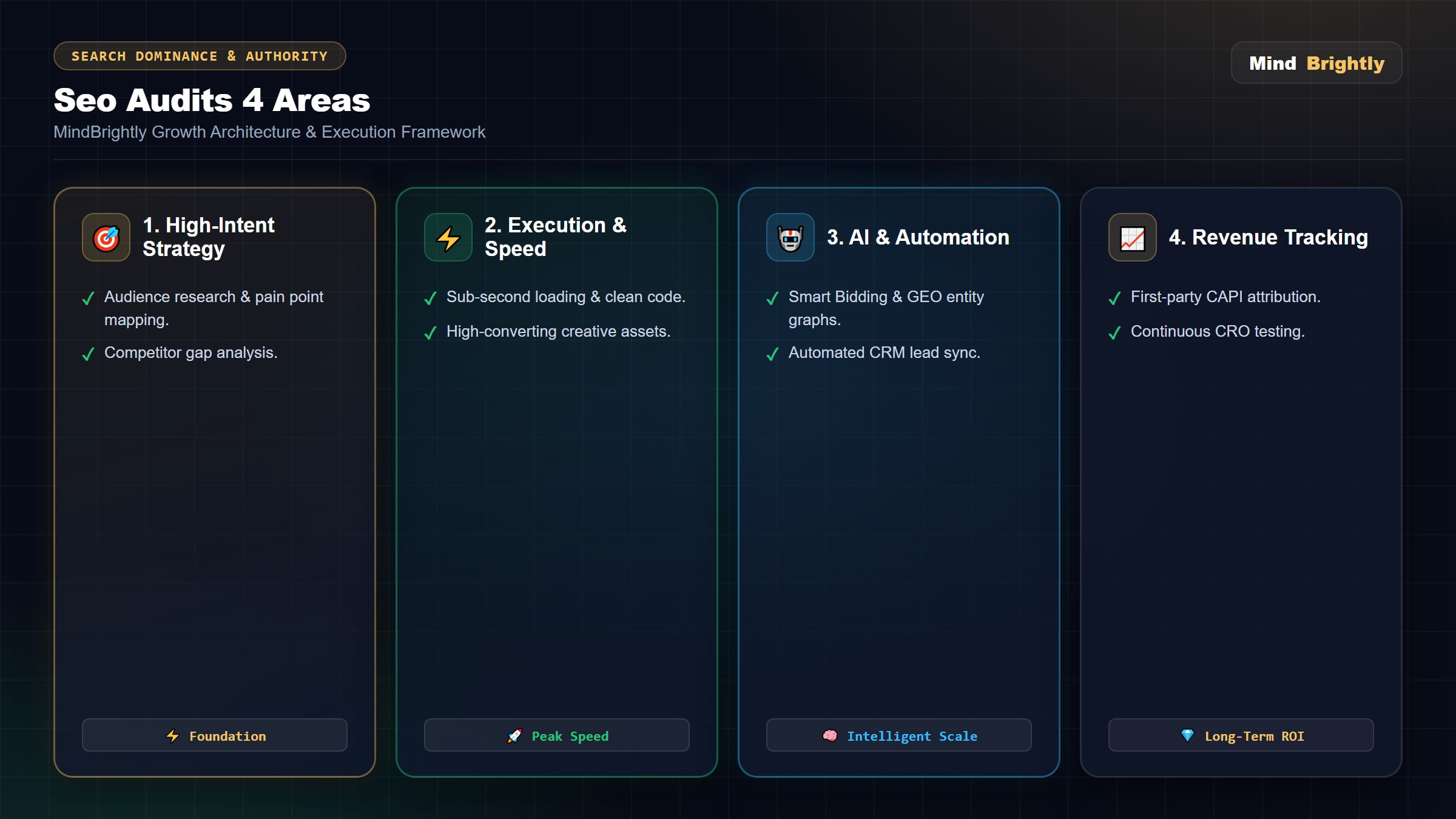
The Ultimate 2026 Framework for Dominating Digital Marketing
While the fundamentals of beginners guide to conversion rate optimization remain crucial, the landscape has shifted violently due to Generative AI, privacy protocols (iOS 14.5+), and changing consumer psychology. In this exclusive deep-dive, we break down the exact technical frameworks MindBrightly uses to generate 10x ROI for our enterprise and local clients.
1. The Shift to Generative Engine Optimization (GEO)
Traditional Search Engine Optimization (SEO) was built on "Ten Blue Links." In 2026, over 65% of informational queries end in a "Zero-Click Search." Users ask a question, and Google AI Overviews, ChatGPT Search, or Perplexity AI instantly provide the answer without the user ever clicking your website.
To adapt your Digital Marketing strategy, you must transition to Generative Engine Optimization (GEO). AI models do not read websites like humans; they parse knowledge graphs and assess entity relationships.
- Entity Salience: Your brand must be recognized as a distinct entity in Google's Knowledge Graph, not just a keyword string.
- Information Gain: AI models penalize derivative content. Your articles must include proprietary data, original research, or unique expert quotes that exist nowhere else on the internet.
- Citation Formatting: Structuring your data in clean, semantic HTML tables and bullet points increases the likelihood of an AI tool citing you as the primary source in a summarized answer.
2. Defeating Signal Loss with Meta Conversions API (CAPI)
If your Digital Marketing campaigns rely solely on browser-based tracking (like the standard Meta Pixel or Google Analytics 4 client-side tags), you are bleeding budget. Browsers like Safari (ITP) and Firefox aggressively block third-party cookies, and iOS 14.5+ users overwhelmingly opt out of tracking.
The Solution: Server-Side Tracking. By implementing Google Tag Manager Server-Side (sGTM), the data flow changes entirely. Instead of the user's browser sending a signal to Facebook (which gets blocked), your web server directly sends a secure, hashed API payload to Meta's servers.
This recovers up to 40% of "lost" conversion data. When Meta's Advantage+ algorithms receive 40% more conversion signals, they exit the learning phase faster, drastically reducing your Cost Per Acquisition (CPA).
3. The B2B Playbook: Account-Based Marketing (ABM)
Applying B2C tactics to a B2B Digital Marketing strategy is the number one reason agencies fail. B2B sales cycles take 3 to 12 months, involve multiple stakeholders (CFO, CTO, Procurement), and have high ticket values. You cannot sell a $50,000 SaaS contract using a generic Facebook image ad.
MindBrightly utilizes Account-Based Marketing (ABM). We do not target "demographics"; we target specific companies.
- IP Identification: We identify the corporate IP addresses of your top 100 target accounts (e.g., Infosys HQ in Bangalore).
- Role-Based Targeting: We run LinkedIn Thought Leadership Ads exclusively to employees holding "Director" or "C-Level" titles within those specific IPs.
- High-Intent Lead Magnets: The ad creative is never "Buy our software." It is an interactive ROI Calculator or an in-depth Industry Whitepaper that requires a work email to access.
4. WhatsApp Automation & Zero-Friction Lead Nurturing
In the Indian market, email marketing is practically dead for B2C and struggling in B2B. With average open rates plummeting below 15%, relying on email autoresponders for your Digital Marketing campaigns will result in massive lead drop-off.
Enter the WhatsApp Cloud API. With a 98% open rate, WhatsApp is the ultimate conversion engine. When a prospect submits a lead form on your website or Meta Ad, our automated systems instantly (within 3 seconds) send them a personalized WhatsApp message.
- Instant Gratification: The message contains exactly what they requested (a PDF brochure, a pricing link, or a portfolio).
- Interactive Buttons: We use WhatsApp interactive UI (Quick Reply Buttons) to ask qualifying questions like "What is your budget?" or "Schedule a Call."
- AI Chatbot Handoff: If the user asks a complex question, our integrated AI chatbot answers them instantly based on your company's knowledge base, only handing over to a human agent when the prospect is ready to close.
5. Conversion Rate Optimization (CRO) & Core Web Vitals
Driving 10,000 visitors to a slow, unoptimized landing page is a waste of capital. Your Digital Marketing strategy is only as strong as your Conversion Rate.
Google's Core Web Vitals (CWV) algorithm update mandates that sites pass stringent speed tests. Specifically, your Largest Contentful Paint (LCP) must occur under 2.5 seconds, and your Interaction to Next Paint (INP) must be under 200 milliseconds.
To achieve this, we abandon bloated WordPress templates. We engineer custom architectures using tools like Vite and static-site generation. A site that loads in 0.8 seconds not only ranks higher organically but enjoys a significantly lower Cost Per Click (CPC) on Google Ads due to higher Quality Scores.
Take Your Digital Marketing to the Enterprise Level
Stop losing market share to competitors with inferior products but superior data pipelines.
Explore MindBrightly's Core Services & Industry Solutions
Core Growth Services
Industry Specific Marketing
Flawless Execution
Our Conversion Rate Optimization Explained (Without the Jargon) Blueprint
We don't do guesswork. Every campaign follows a rigorous, data-driven framework designed to maximize ROI and eliminate wasted spend.
Deep Audit & Strategy
We analyze your current setup, spy on your top competitors, and identify exact conversion bottlenecks before spending a single rupee.
Technical Implementation
From Server-Side Tracking to robust Schema markup, we lay a flawless technical foundation so algorithms feed on perfect data.
Aggressive Scaling
Once we hit your target Cost Per Acquisition (CPA), we aggressively scale the budget using AI-bidding to dominate your market share.
FAQs About Conversion Rate Optimization Explained (Without the Jargon)
Common questions we get from founders and marketing heads.